

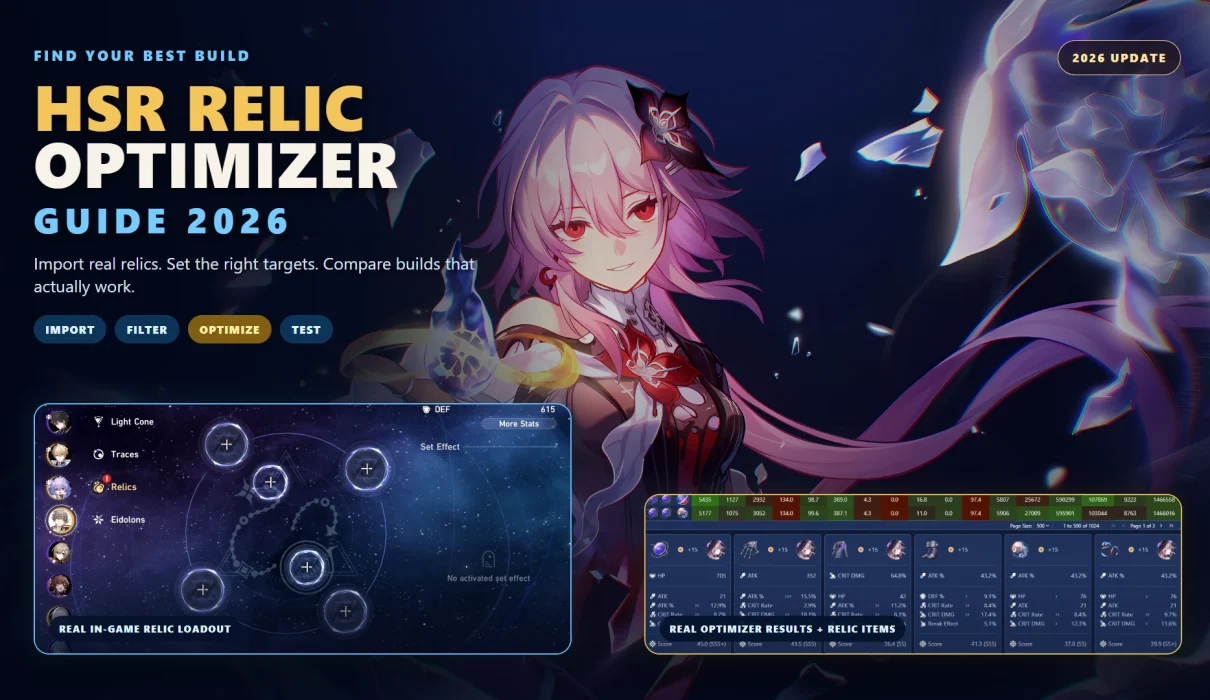
An HSR relic optimizer helps you find the strongest relic combination your account can build right now—not an imaginary perfect build that requires another month inside a Cavern of Corrosion.
Instead of comparing hundreds of Head, Hands, Body, Feet, Planar Sphere, and Link Rope pieces manually, an optimizer checks thousands or even millions of possible combinations against the targets you set. It can search for more damage, specific Speed breakpoints, enough Effect Hit Rate, better Break Effect, safer sustain stats, or a precise turn order for advanced teams.
However, an optimizer is only as reliable as its settings. Choosing the wrong damage calculation, entering unrealistic combat buffs, forcing a four-piece set, or forgetting a required Speed threshold can produce a build that looks excellent in the tool but performs worse in actual combat.
This guide explains how to import relics, configure an optimizer correctly, compare like-for-like results, avoid common mistakes, and decide when additional farming is likely to produce a meaningful upgrade.
Tool features and import guidance were checked against the current Fribbels interface, its project repository, Reliquary Archiver, and the HSR Scanner documentation on July 30, 2026. Interface labels and compatibility can change, so follow the current instructions shown by each tool.
The best HSR relic optimizer workflow is to import accurate account data, select the exact character, Light Cone, Eidolons, Traces, teammates, and enemy conditions, then set mandatory thresholds such as Speed, CRIT Rate, Effect Hit Rate, Break Effect, HP, or DEF. Run a broad search first, compare several top results, and test the final build in-game. Fribbels is the strongest all-in-one option for full-inventory optimization; UID or profile-showcase imports are faster but cannot normally search every unequipped relic.
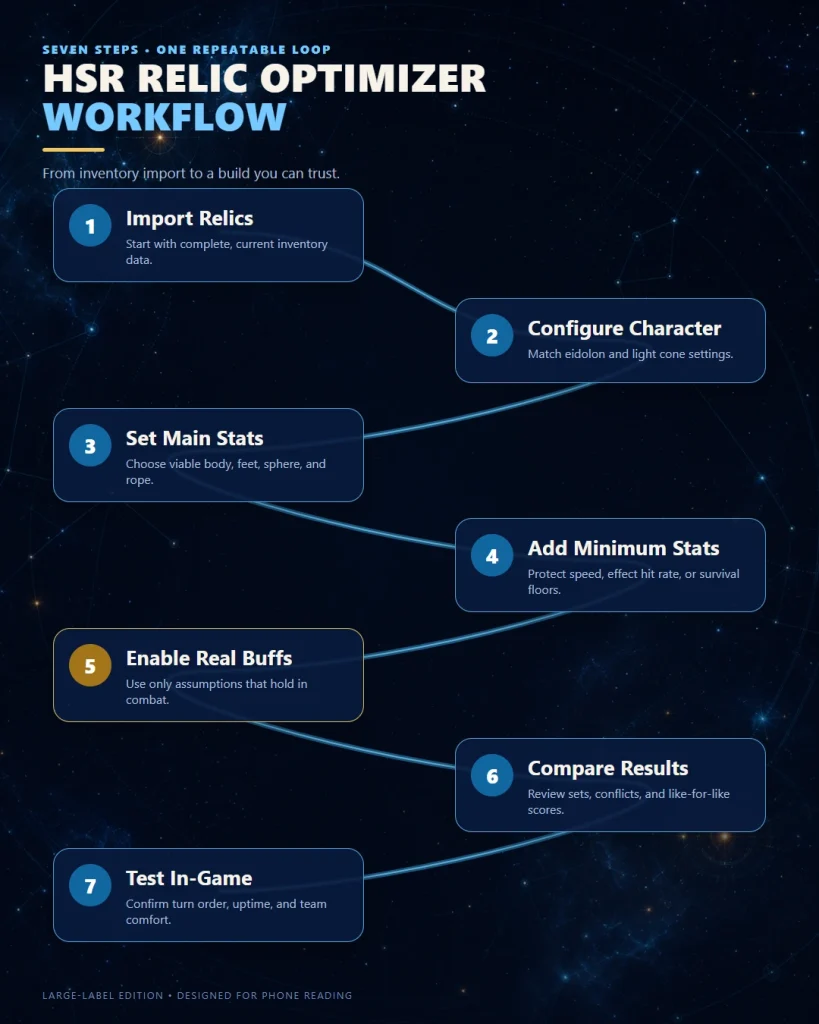
Image: Honkai: Star Rail © HoYoverse
Contents
- 1 🧠 What Is an HSR Relic Optimizer?
- 2 🛠️ Best HSR Relic Optimizer Tools
- 3 ✅ Before You Start: Optimization Checklist
- 4 📥 How to Import Your HSR Relics
- 5 ⚙️ How to Use an HSR Relic Optimizer Step by Step
- 5.1 👤 Step 1: Configure the Character Correctly
- 5.2 🧩 Step 2: Select Relic Sets, Slots, and Main Stats
- 5.3 🎯 Step 3: Add Minimum and Maximum Stat Targets
- 5.4 🤝 Step 4: Add Teammates and Combat Buffs
- 5.5 ⚔️ Step 5: Choose the Correct Optimization Target
- 5.6 📊 Step 6: Run the Search and Compare Several Results
- 5.7 🧪 Step 7: Compare Like-for-Like Builds Only
- 6 🏃 How to Set Realistic HSR Stat Targets
- 7 🔍 How to Read HSR Relic Optimizer Results
- 8 🎭 HSR Relic Optimizer Settings by Character Role
- 9 ⏱️ How to Speed-Tune an HSR Team with an Optimizer
- 10 ⚠️ 12 Common HSR Relic Optimizer Mistakes
- 10.1 1. Forcing the Recommended Four-Piece Set
- 10.2 2. Using a Generic DPS Scoring Profile
- 10.3 3. Forgetting a Minimum Speed Requirement
- 10.4 4. Optimizing the Wrong Ability
- 10.5 5. Enabling Every Combat Buff
- 10.6 6. Ignoring Debuff Accuracy
- 10.7 7. Comparing Builds with Different Assumptions
- 10.8 8. Moving Relics from Another Core Character
- 10.9 9. Treating a Relic Grade as a Universal Rating
- 10.10 10. Trusting Imported Data Without Verification
- 10.11 11. Optimizing Only for Maximum Damage
- 10.12 12. Never Testing the Result In-Game
- 11 ♻️ Relic Upgrade and Farming Workflow
- 12 🏁 Final HSR Relic Optimization Checklist
- 13 ❓ HSR Relic Optimizer FAQ
- 13.1 What is the best HSR relic optimizer?
- 13.2 Is the Fribbels HSR Optimizer safe?
- 13.3 Can I use an HSR relic optimizer on mobile?
- 13.4 What is the difference between a relic optimizer and a relic scorer?
- 13.5 Why does my HSR relic optimizer show no results?
- 13.6 Should I always use the optimizer’s Rank 1 build?
- 13.7 Should I force a four-piece relic set?
- 13.8 How often should I import my HSR relics again?
- 13.9 Can a relic optimizer calculate Speed breakpoints?
- 13.10 Does a higher relic score always mean more damage?
- 13.11 Is an optimizer useful for F2P players?
🧠 What Is an HSR Relic Optimizer?
An HSR relic optimizer is a community-made tool that searches your available relics and calculates which combination best satisfies a selected objective.
Depending on the tool and character, the objective may include:
- Maximizing Skill, Ultimate, follow-up, DoT, Break, memosprite, or total rotation damage
- Reaching a minimum Speed threshold
- Maintaining a required CRIT Rate
- Reaching enough Effect Hit Rate for reliable debuffs
- Increasing Break Effect while preserving Speed
- Finding a survivable support or sustain build
- Creating a specific turn order between teammates
- Finding usable builds without removing relics from higher-priority characters
The optimizer does not generate new relics. It searches the pieces you already own and identifies combinations that are difficult to notice manually.
A relic scorer grades an individual relic or an already-equipped build according to predefined stat weights. An optimizer searches multiple relic combinations to solve a specific build problem.
A high-scoring relic can still be wrong for your target build, while a lower-scoring relic may be essential because it completes a Speed breakpoint, supplies Effect Hit Rate, or activates a valuable set bonus. Our HSR Relic Scorer guide explains how scoring systems should—and should not—be used.
| Tool Type | What It Does | Best Use | Main Limitation |
|---|---|---|---|
| Relic scorer | Grades a relic or equipped character | Fast build checks and upgrade decisions | Does not test every inventory combination |
| Relic optimizer | Searches combinations under selected constraints | Finding the strongest practical build | Bad settings can create misleading results |
| Damage calculator | Estimates damage under defined combat conditions | Comparing rotations, buffs, and Light Cones | Results depend heavily on combat assumptions |
🛠️ Best HSR Relic Optimizer Tools
There is no official HoYoverse tool that searches every relic combination in your inventory. The most capable options are community tools, and the correct choice depends on how much account data you want to import.
| Tool or Method | Inventory Coverage | Best For | Main Limitation |
|---|---|---|---|
| Fribbels HSR Optimizer | Full inventory with a compatible importer | Account-wide optimization, breakpoints, rotation damage, relic conflicts, and build comparisons | More setup and more settings to verify |
| Fribbels Showcase / UID Import | Characters visible on the public profile showcase | Fast build scoring and mobile-friendly checks | Cannot normally search hidden unequipped relics |
| Manual relic entry or scorer | Only the pieces you enter | Checking one new relic or a small upgrade decision | Too slow for a large inventory |
🏆 Best Overall: Fribbels HSR Optimizer
Fribbels HSR Optimizer combines a character showcase, optimization engine, damage calculator, build benchmarks, relic analysis, and account-planning tools. Its optimization engine can search for stat breakpoints, ability damage, or rotation damage while accounting for character settings, teammates, buffs, relic sets, main stats, and minimum stat requirements.
Its greatest strength is control. That control is also the main risk: an incorrect Eidolon, Superimposition, enemy state, buff condition, or rotation can make a polished result misleading.
📱 Best for a Fast Check: UID and Showcase Import
A showcase import is the easiest option when you want to inspect an equipped build without installing a scanner. It is useful for quick scoring, sharing character cards, or comparing the characters currently displayed on your profile.
The limitation is coverage. A profile showcase does not expose your complete unequipped inventory, so it cannot discover a better build hidden across relics stored on other characters or left unused.
Use UID or showcase import for a quick health check. Use a full-inventory importer when rebuilding an important character, tuning exact Speed order, comparing many relic combinations, or preparing two endgame teams without creating relic conflicts.
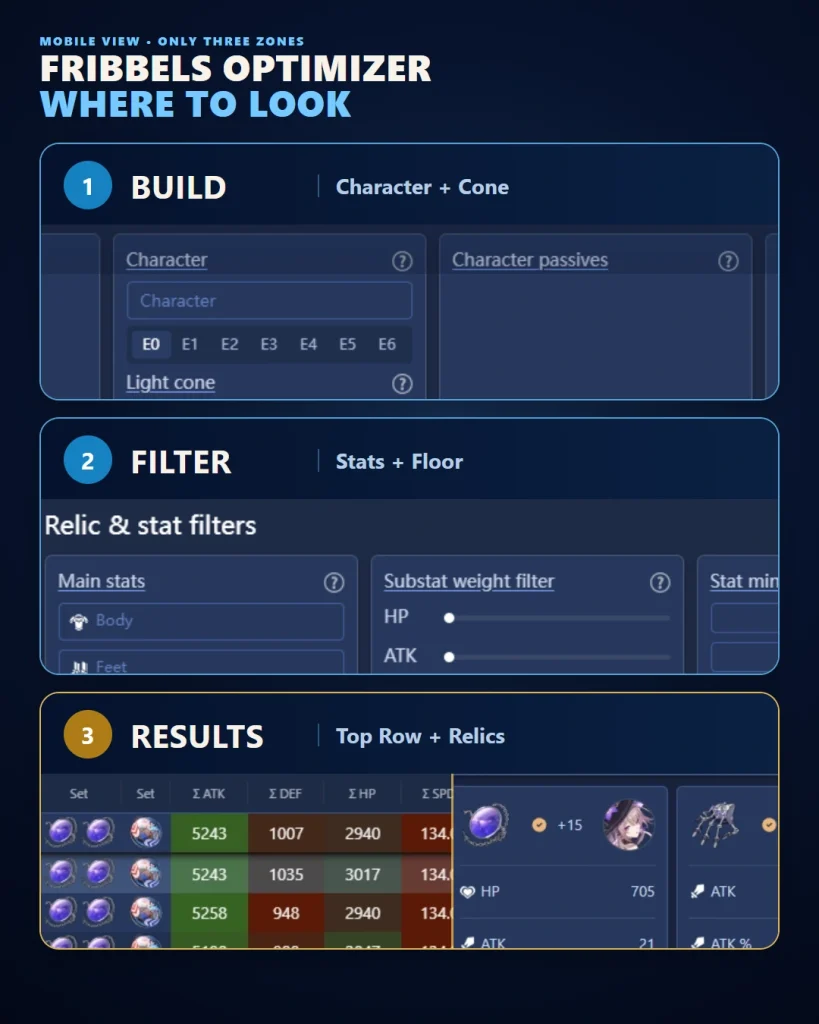
Image: Honkai: Star Rail © HoYoverse
✅ Before You Start: Optimization Checklist
Do not begin by selecting every relic set and pressing Optimize. First decide what problem the build needs to solve.
Use this checklist:
- ☐ Confirm the character’s actual role in the team
- ☐ Confirm whether the build is for Memory of Chaos, Pure Fiction, Apocalyptic Shadow, farming, or general use
- ☐ Decide whether the character needs Speed or will be action-advanced by a teammate
- ☐ Identify mandatory main stats
- ☐ Identify required Effect Hit Rate, Break Effect, Energy, or survivability
- ☐ Confirm the equipped Light Cone and Superimposition level
- ☐ Decide which teammates and buffs are present consistently
- ☐ Decide whether equipped relics on other characters can be moved
- ☐ Choose the ability or rotation that represents real combat performance
A theoretically stronger personal build can weaken the team if it breaks turn order, removes relics from a more important unit, reduces debuff consistency, or causes buffs to expire before the damage window.
From a planning perspective, character role matters more than the letter grade attached to a relic. Review the character’s scaling, combat role, and intended team before deciding which stats deserve weight.
📥 How to Import Your HSR Relics
The best import method depends on whether you need a quick equipped-build check or a complete inventory search. Import options and patch compatibility can change, so follow the current instructions shown inside Fribbels and the importer repository.
| Import Method | Speed | Coverage | Best Use |
|---|---|---|---|
| UID / Showcase | Fast | Showcased characters and equipped relics | Quick scoring and mobile checks |
| Reliquary Archiver | Very fast | Full inventory and character roster | Recommended full-account import and live updates |
| HSR Scanner | Slower OCR scan | Full inventory and character roster | Alternative when the recommended importer is unavailable |
| HoYoLab import | Fast | Equipped character data | No-download account snapshot |
| Manual entry | Slow | Selected relics only | One relic or a small comparison |
🪪 Method 1: UID and Showcase Import
A UID import reads publicly displayed character data from your Honkai: Star Rail profile. It is the easiest method because it does not require a full inventory scan.
Best for:
- Checking an equipped character
- Sharing or comparing showcased builds
- Using a browser-based relic scorer on mobile
- Reviewing a small number of characters quickly
Limitations:
- It cannot normally see your complete unequipped relic inventory
- Only displayed characters may be available
- Profile data may take time to refresh
- A hidden upgrade cannot be found if the relevant relic is not exposed
⚡ Method 2: Reliquary Archiver Full-Inventory Import
Fribbels currently recommends Reliquary Archiver for full-inventory import. It is designed to import the relic inventory and character roster quickly, preserve more precise Speed data, and support live importing when relics are obtained or enhanced.
A typical workflow is:
- Open the importer instructions from the official project repository.
- Confirm that the current release supports your game patch.
- Run the importer using the documented setup process.
- Connect or export the data to Fribbels.
- Check several relics and character values against the game.
- Save a backup of the optimizer data before making major changes.
🖥️ Method 3: HSR Scanner OCR Import
HSR Scanner uses optical character recognition to read relic, Light Cone, and character data from the game interface and export it to JSON. It remains a useful alternative, but an OCR scan takes longer and hidden Speed decimals cannot be captured perfectly.
The project documentation instructs users to set the game text to English, use a 16:9 resolution, place the inventory interface over a darker background for better contrast, run the scanner with the permissions required for automated input, and avoid moving the mouse during the scan.
- Set the in-game text language to English.
- Use a supported 16:9 resolution such as 1920×1080 or 1280×720.
- Face a darker scene so the translucent inventory text has strong contrast.
- Select the relic, Light Cone, and character data you want to scan.
- Set minimum rarity or level filters if you want to shorten the scan.
- Start the scan and do not move the mouse.
- Import the generated JSON file into Fribbels.
- Verify set names, levels, main stats, substats, equipped characters, and lock status.
🌐 Method 4: HoYoLab or Equipped-Character Import
A HoYoLab-style import can provide a fast no-download snapshot of equipped characters. It is more convenient than an OCR scan but does not offer the same full-inventory coverage, and some imported Speed values may not preserve hidden decimal precision.
Use this method when you want to optimize or inspect the characters you already have equipped and do not need to search every stored relic.
✍️ Method 5: Manual Entry
Manual entry is practical when you are comparing only a few pieces. It is not efficient for an inventory containing hundreds or thousands of relics.
- Enter a newly upgraded relic
- Compare two Body, Feet, Sphere, or Rope options
- Test a hypothetical main stat
- Check whether one relic deserves more EXP
- Use only the developer’s official website, repository, or release page.
- Do not enter your HoYoverse password into an optimizer or unknown website.
- Check patch compatibility and recent release activity before running an importer.
- Keep a backup of the original export and optimizer data.
- Verify imported values before equipping or salvaging relics.
Compare at least one relic from each slot with the in-game version. Check the set, rarity, enhancement level, main stat, every substat, equipped character, lock status, and displayed Speed. One import error can change the optimizer’s preferred build.
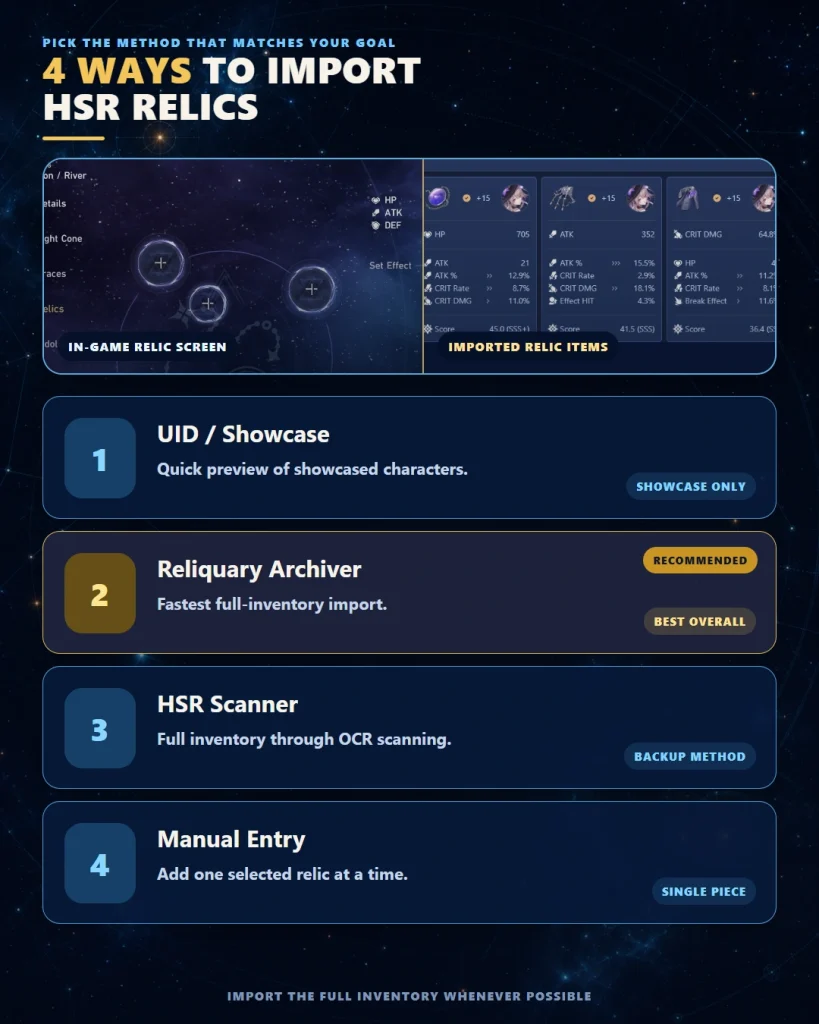
Image: Honkai: Star Rail © HoYoverse
⚙️ How to Use an HSR Relic Optimizer Step by Step
The exact button names can change, but the underlying process remains consistent.
👤 Step 1: Configure the Character Correctly
Select the character and verify every build variable that changes base stats, scaling, or damage calculations.
| Setting | Why It Matters | Common Error |
|---|---|---|
| Character level | Changes base stats and damage calculations | Calculating at Level 80 when the character is not fully raised |
| Eidolons | May change rotations, scaling, buffs, debuffs, or stat needs | Leaving the default Eidolon level selected |
| Traces | Affects multipliers and unlocked passives | Assuming maximum Traces without checking |
| Light Cone | Changes base stats and passive effects | Using the signature Light Cone in the tool while owning an alternative |
| Superimposition | Changes passive values | Comparing an S1 build with an accidental S5 setting |
Before optimizing, review how main stats and substats interact in our HSR relic stats guide. This is especially important for characters whose best stat changes with Eidolons, Light Cones, or teammates.
🧩 Step 2: Select Relic Sets, Slots, and Main Stats
Start with broad filters. Do not force a four-piece set unless its bonus is essential to the character’s kit or rotation.
A practical first search should normally allow:
- The expected best four-piece set
- Relevant two-piece plus two-piece combinations
- Useful off-set or “rainbow” builds
- More than one viable Planar Ornament set
- All realistic Body, Feet, Sphere, and Rope main stats
Your first run should answer, “What is the strongest build I can make?” A later run can answer, “What is the strongest build using this exact four-piece set?” Comparing both results reveals the real cost of forcing the set bonus.
🎯 Step 3: Add Minimum and Maximum Stat Targets
Stat targets prevent the optimizer from returning a mathematically strong but unusable build.
Common minimum targets include:
- Minimum Speed
- Minimum CRIT Rate
- Minimum Effect Hit Rate
- Minimum Break Effect
- Minimum HP or DEF for survivability
- Minimum Effect RES for a specific setup
Maximum limits can also be useful. For example, if a character only needs a certain amount of Effect Hit Rate, a maximum target can stop the optimizer from overvaluing additional EHR rolls that provide little practical benefit.
🤝 Step 4: Add Teammates and Combat Buffs
Only enable buffs that will actually be active during the optimized attack or rotation.
Check:
- Which teammate provides the buff?
- Is the buff active before the selected attack?
- Does the character receive the full value?
- Does the buff depend on Speed, Energy, Skill Points, debuffs, or enemy state?
- Is the enemy Weakness Broken?
- Are all assumed debuffs applied reliably?
- Does the selected Light Cone passive have full stacks?
A screenshot-damage setup can overvalue CRIT DMG, ATK, Break Effect, or DMG% while ignoring rotation consistency. Optimize for the state your team reaches reliably, not the state it reaches once in a perfect showcase run.
⚔️ Step 5: Choose the Correct Optimization Target
The optimizer needs to know what it should maximize. This may be a single ability or a multi-action rotation.
| Character Type | Useful Optimization Target | Avoid |
|---|---|---|
| Skill-focused DPS | Skill or realistic Skill-based rotation | Optimizing only the Ultimate because it has a larger single number |
| Ultimate-focused DPS | Ultimate plus setup actions when available | Ignoring Energy and rotation length |
| Follow-up attacker | Follow-up or combined rotation damage | Judging the build from Basic or Skill damage alone |
| DoT character | DoT or realistic detonation rotation | CRIT-based damage targets |
| Break DPS | Break or Super Break calculations with correct enemy state | Standard CRIT damage as the only objective |
| Support | Required Speed, Energy, Effect Hit Rate, and survival | Maximizing personal damage at the expense of rotation |
📊 Step 6: Run the Search and Compare Several Results
Do not stop at Rank 1. Compare at least the top five to ten results.
Look for:
- Expected damage difference
- Final Speed and turn order
- CRIT consistency
- Required relic swaps
- Characters losing equipped pieces
- Set effects gained or lost
- Survivability
- Ease of using the build in multiple teams
In practice, Rank 1 is often the theoretical maximum under the selected assumptions, while a result slightly lower on the list may be easier to use because it preserves another character’s build, has more CRIT Rate, or works in more than one team.
🧪 Step 7: Compare Like-for-Like Builds Only
Keep the character, team, enemy, target count, buffs, debuffs, rotation, Light Cone, Eidolons, and Speed benchmark identical when comparing relic builds.
Fribbels explicitly warns that Combo DMG and DPS Score are intended to compare relic builds inside the same configured setup. Different teams, Light Cones, Eidolons, versions, or rotations can change action advance, Energy, and other mechanics that a fixed rotation does not capture.
To compare a Light Cone, Eidolon, or team change, rebuild the complete combat setup and evaluate the actual rotation rather than treating a higher DPS Score as a universal verdict.
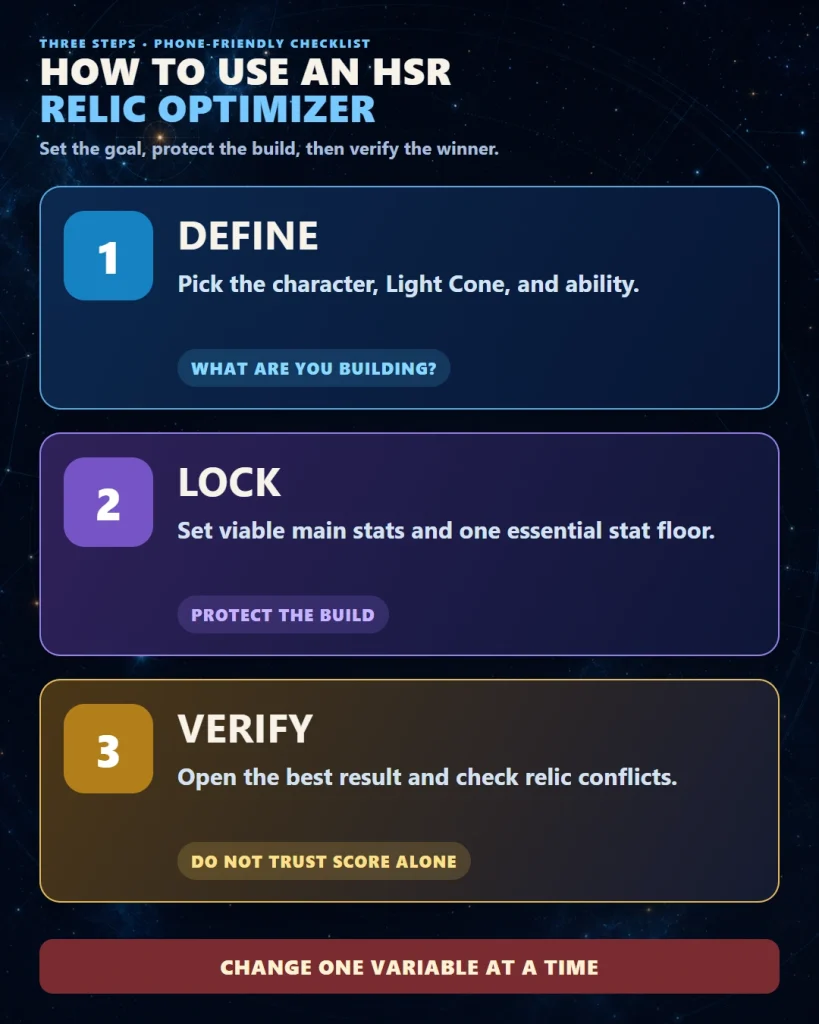
Image: Honkai: Star Rail © HoYoverse
🏃 How to Set Realistic HSR Stat Targets
The best stat target is not the largest number you can reach. It is the minimum required to make the team’s rotation work, followed by the stats that improve performance after that requirement is satisfied.
⏱️ Speed
Speed should be treated as a breakpoint or turn-order requirement, not as a stat that every character must maximize.
A Speed target may be determined by:
- The number of actions required within a cycle
- A teammate who must act before or after the DPS
- An action-advance support
- A Planar Ornament or relic-set condition
- A buff that expires after a fixed number of turns
- Skill Point generation and consumption
Use our HSR Speed breakpoints guide to choose a target before entering a random minimum into the optimizer.
🎯 CRIT Rate and CRIT DMG
CRIT DPS characters need consistent CRIT Rate before additional CRIT DMG becomes reliable. The familiar 1:2 ratio is a useful starting reference, but it is not an absolute rule.
Account for:
- In-combat CRIT buffs
- Conditional relic bonuses
- Light Cone passives
- Eidolons and Traces
- Enemy-specific effects
- Whether the optimized ability contains one hit or many hits
A multi-hit attack can feel more consistent at moderate CRIT Rate than a single-hit nuke, but missing CRIT on a major hit can still reduce practical performance substantially.
🎯 Effect Hit Rate
Effect Hit Rate should be optimized around the debuff that matters. Do not copy an EHR target from a different character merely because both follow the Nihility Path.
Consider:
- The base chance of the effect
- The enemy’s Effect RES
- Trace bonuses
- Light Cone effects
- Whether missing the debuff breaks the entire rotation
💥 Break Effect
Break and Super Break teams usually prioritize Break Effect and Speed, but the exact balance depends on the character’s kit, team buffs, Toughness damage, and the content being cleared.
Do not automatically remove every defensive substat. A Break character who is defeated before the damage window has an effective damage output of zero.
🛡️ HP, DEF, Healing, and Effect RES
Support and sustain optimization is usually about reaching a safe floor rather than maximizing one stat endlessly.
A practical support build may prefer:
- Enough Speed to act at the correct time
- Enough Energy Regeneration for the intended rotation
- Enough Effect Hit Rate for a key debuff
- Enough HP or DEF to survive difficult content
- Effect RES when crowd control would ruin the rotation
| Priority Level | Meaning | Example |
|---|---|---|
| Mandatory | The build fails without it | Required Speed order or debuff accuracy |
| Functional | Makes the rotation stable | Enough Energy, HP, DEF, or CRIT Rate |
| Optimization | Improves output after the build works | More CRIT DMG, ATK, Break Effect, or DMG% |
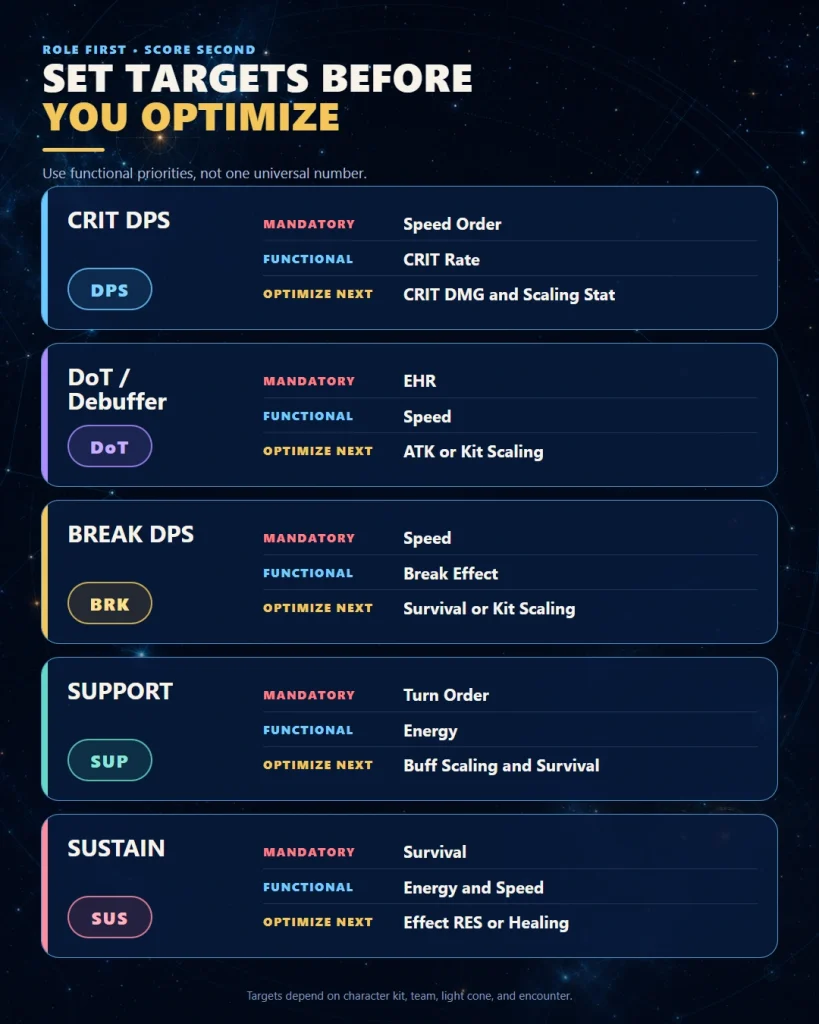
Image: Honkai: Star Rail © HoYoverse
🔍 How to Read HSR Relic Optimizer Results
An optimizer result is not a command. It is a model built from the data and assumptions you entered.
📈 Build Rank
Build rank shows how the result performs according to the selected objective. It does not mean Rank 1 is universally superior in every team or game mode.
💯 Relic Score and Potential
Some tools display a score for current relic quality and a potential score for relics that are not fully upgraded.
Potential is useful when deciding whether a +0, +3, +6, or +9 relic deserves more EXP. However, maximum potential often assumes favorable future rolls. Average potential is usually a more realistic planning metric.
⚔️ Damage Output
Damage values are useful for comparing builds under identical settings. They should not be treated as guaranteed in-game damage because enemy DEF, resistance, Weakness state, buffs, debuffs, target count, and rotation timing can change the result.
🧩 Set Bonuses
Compare the raw damage difference between a full set and a mixed build. The strongest practical relic combination may be:
- A complete four-piece set
- Two two-piece bonuses
- A two-piece set plus strong off-set pieces
- A full rainbow build with superior substats
The relative value of these options depends on the character and set effect. Our best HSR relic sets guide explains why set value cannot be ranked independently from character mechanics.
🔄 Relic Conflicts
Always check whether the proposed build removes relics from another active character.
A 4% gain on one DPS may not be worthwhile if it destroys the Speed tuning of a second team. This matters in endgame modes that require multiple lineups.
| Result | What to Check | Decision |
|---|---|---|
| Highest damage, low CRIT Rate | Hit count and consistency | Compare with a slightly lower but more stable result |
| Highest damage, below Speed target | Action count and turn order | Reject unless Speed is genuinely unnecessary |
| Mixed set beats four-piece set | Whether the four-piece effect is included correctly | Use the mixed set if the calculation matches real combat |
| Small gain requiring several swaps | Impact on other teams | Keep the current build if account disruption is larger than the gain |
Use optimizer rankings to create a shortlist. Use team logic and an in-game test to choose the final build.
🎭 HSR Relic Optimizer Settings by Character Role
🗡️ CRIT DPS
Prioritize: required Speed, CRIT Rate consistency, scaling stat, CRIT DMG, elemental or universal DMG bonuses.
Recommended search process:
- Set the minimum Speed needed by the team.
- Set a reasonable minimum CRIT Rate.
- Allow all viable Body and Feet main stats.
- Optimize the ability or rotation that contributes the most real damage.
- Compare full-set, mixed-set, and rainbow results.
☠️ DoT DPS and Debuffer
Prioritize: required Effect Hit Rate, Speed, ATK or character-specific scaling, DoT damage, and enough survival.
CRIT usually has little or no value for standard DoT damage. Do not use a generic DPS scoring profile that automatically rewards CRIT Rate and CRIT DMG.
💥 Break and Super Break DPS
Prioritize: Speed, Break Effect, Toughness interaction, character-specific scaling, and survival.
Make sure the optimizer is calculating the correct enemy state. A Break-oriented build evaluated against an unbroken enemy with a normal CRIT objective will produce misleading results.
🎼 Buffer and Action-Advance Support
Prioritize: exact turn order, Speed, Energy requirements, buff-scaling stat, and survivability.
Do not maximize a support’s Speed without checking the DPS. Some teams want the support before the DPS, while others require a controlled slower setup.
🛡️ Sustain
Prioritize: Speed, Energy, outgoing healing or shield scaling, HP or DEF, Effect RES, and any required debuff accuracy.
A sustain optimizer profile should solve survival and rotation problems. Personal damage is a secondary consideration unless the character’s kit makes it a meaningful part of the team.
🧠 Hybrid and Mechanic-Dependent Characters
Some characters combine personal damage, team utility, summons, memosprites, follow-up attacks, debuffs, Break mechanics, or unusual turn systems. For these characters, a generic preset may miss an important part of the kit.
Review the complete team structure using our HSR Team Builder guide before deciding which part of the kit should be optimized.
| Role | First Constraint | Main Objective | Common Trap |
|---|---|---|---|
| CRIT DPS | Speed and CRIT Rate | Realistic rotation damage | Overvaluing CRIT DMG |
| DoT | Effect Hit Rate and Speed | DoT or detonation output | Using CRIT weights |
| Break | Speed and Break Effect | Break or Super Break output | Wrong enemy state |
| Support | Turn order | Buff uptime and rotation | Maximizing personal damage |
| Sustain | Survival and Energy | Reliable healing or shielding | Ignoring Effect RES |
⏱️ How to Speed-Tune an HSR Team with an Optimizer
Speed tuning is one of the strongest reasons to use a full relic optimizer. Manually finding a build that reaches a narrow Speed range without ruining other stats can be frustrating.
1. Decide the Desired Turn Order
Write the order before setting any filters.
Debuffer → Buffer → Main DPS → Sustain
Or, for a controlled action-advance setup:
DPS → Action-Advance Support → DPS Again
2. Record In-Combat Speed Changes
Include:
- Relic-set Speed bonuses
- Trace bonuses
- Light Cone effects
- Team buffs
- Conditional Speed changes
- Action advance, which is not identical to Speed
3. Optimize One Character at a Time
Lock the completed build or record its final Speed before optimizing the next character. Recheck the entire team after every major relic change.
4. Leave a Small Safety Margin
A tie or extremely narrow Speed difference can become confusing when conditional effects activate. Use the exact in-game values and avoid assuming that displayed rounded numbers tell the complete story.
Save separate optimizer profiles for different teams. A character’s best Speed may change when moving from a standard hypercarry team to a dual-DPS, summon, Break, or action-advance composition.
⚠️ 12 Common HSR Relic Optimizer Mistakes
1. Forcing the Recommended Four-Piece Set
A set recommendation assumes relics of comparable quality. Your actual mixed pieces may have substantially better substats.
2. Using a Generic DPS Scoring Profile
CRIT-based profiles are unsuitable for many DoT, Break, support, and sustain characters.
3. Forgetting a Minimum Speed Requirement
The optimizer may sacrifice Speed for a larger damage number, reducing total actions or breaking team order.
4. Optimizing the Wrong Ability
A character’s largest single hit may not represent the majority of the rotation.
5. Enabling Every Combat Buff
Maximum buffs can create a showcase build that is inconsistent in ordinary combat.
6. Ignoring Debuff Accuracy
A damage build that misses a required debuff can perform worse than a lower-ranked EHR build.
7. Comparing Builds with Different Assumptions
Keep enemies, buffs, target count, and rotation settings identical when comparing relics or Light Cones.
8. Moving Relics from Another Core Character
An account-wide upgrade must consider both endgame teams, not one optimized screenshot.
9. Treating a Relic Grade as a Universal Rating
Grades depend on character-specific stat weights. An excellent relic for one character may be inefficient for another.
10. Trusting Imported Data Without Verification
OCR may misread a substat, enhancement level, set name, or equipped character.
11. Optimizing Only for Maximum Damage
Survival, Energy, Skill Points, debuff uptime, and turn order also determine clear performance.
12. Never Testing the Result In-Game
The final check should be a real battle using the intended team and content.
- The optimizer recommends CRIT for a non-CRIT damage source.
- The result is below your entered Speed minimum.
- The build uses a Light Cone or Eidolon you do not own.
- The calculated damage assumes buffs your team cannot maintain.
- The recommended relics do not match the imported in-game pieces.
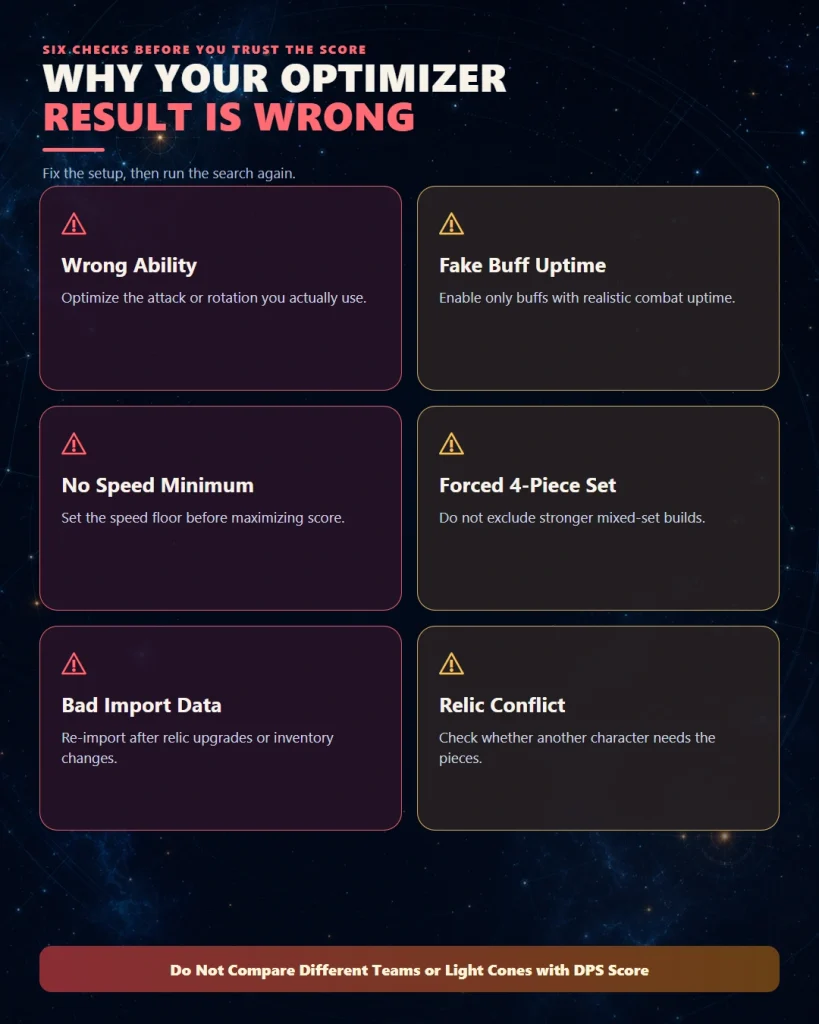
Image: Honkai: Star Rail © HoYoverse
♻️ Relic Upgrade and Farming Workflow
A relic optimizer becomes more valuable when it is part of a repeatable inventory workflow rather than something used once every few months.
🔁 Recommended Weekly Workflow
- Farm the Cavern or Planar set needed by several active characters.
- Lock pieces with valuable main stats or promising substats.
- Upgrade uncertain pieces in controlled stages.
- Re-import new and changed relics.
- Review average and maximum potential.
- Run the optimizer for priority characters.
- Equip and test the selected builds.
- Salvage pieces with no realistic current or future use.
📈 Upgrade in Stages
Do not take every promising relic directly from +0 to +15.
| Upgrade Point | What to Evaluate | Possible Decision |
|---|---|---|
| +3 | Fourth substat or first upgrade roll | Continue if the piece gains a useful stat |
| +6 | Direction of early rolls | Pause weak pieces before EXP cost increases |
| +9 | Whether the relic still has a useful role | Compare average and maximum optimizer potential |
| +12 | Final build relevance | Finish only when the piece improves or completes a build |
| +15 | Completed relic value | Equip, reserve, or use as future upgrade material |
For a complete keep-versus-salvage process, use our HSR Relic Salvage guide before deleting pieces based only on their current score.
⚡ Spend Trailblaze Power Where It Helps Several Builds
From an account-efficiency perspective, a Cavern that supplies relics to multiple active characters is usually more valuable than farming a highly specialized domain for a small theoretical upgrade.
After your main team reaches functional stat targets, the optimizer can reveal whether additional farming offers a meaningful improvement or only a minor increase requiring unusually lucky substats.
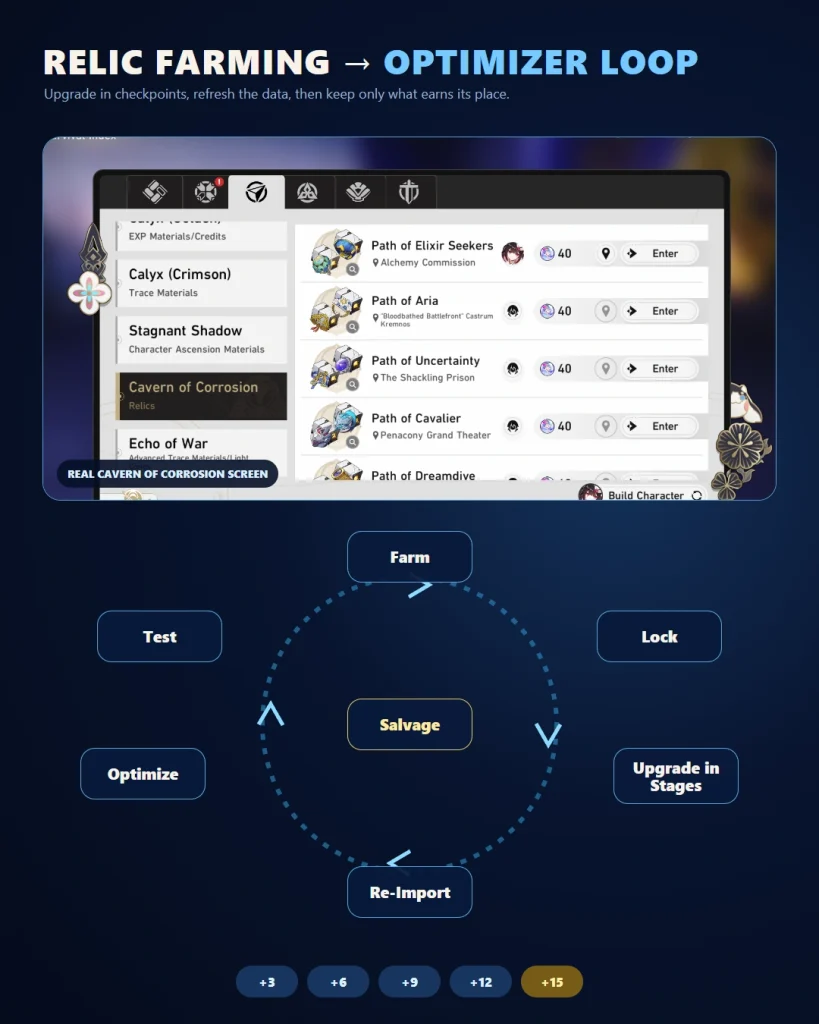
Image: Honkai: Star Rail © HoYoverse
🏁 Final HSR Relic Optimization Checklist
- ☐ Character, Eidolons, Traces, and Light Cone are correct
- ☐ Imported relic values match the game
- ☐ The correct ability or rotation is selected
- ☐ Speed and turn order still work
- ☐ Required CRIT Rate, EHR, Break Effect, HP, or DEF is reached
- ☐ Combat buffs are realistic
- ☐ Set bonuses are calculated correctly
- ☐ Important relics are not stolen from another active team
- ☐ The build survives the intended content
- ☐ The result has been tested in-game
Final rule: the best optimizer build is not necessarily the build with the largest number. It is the build that reaches the required thresholds, preserves the team’s rotation, performs consistently, and uses your account’s relics efficiently.
❓ HSR Relic Optimizer FAQ
What is the best HSR relic optimizer?
Fribbels HSR Optimizer is the most complete option for players who want to import a large relic inventory, set detailed stat requirements, compare damage targets, and manage relic combinations across multiple characters. UID-based scorers are easier for quick checks but usually have less inventory coverage.
Is the Fribbels HSR Optimizer safe?
Fribbels is an open-source community project, but it is not an official HoYoverse product. Use the official project website and repository, never enter your HoYoverse password into an optimizer, verify importer releases, and review current documentation before running third-party software.
Can I use an HSR relic optimizer on mobile?
You can use browser-based showcase, UID, and scoring tools on mobile. Full-inventory import is usually easier on PC, but mobile players can still optimize characters visible through their profile or enter selected relics manually.
What is the difference between a relic optimizer and a relic scorer?
A relic scorer evaluates one relic or an equipped build using stat weights. A relic optimizer searches combinations from your available inventory and finds builds that meet specific targets such as Speed, CRIT Rate, Effect Hit Rate, Break Effect, or damage.
Why does my HSR relic optimizer show no results?
Your filters may be too restrictive. Remove unnecessary set requirements, widen the allowed main stats, lower unrealistic minimum stats, confirm that enough relics were imported, and check whether equipped or locked pieces have been excluded from the search.
Should I always use the optimizer’s Rank 1 build?
No. Compare several top results and check CRIT consistency, Speed, turn order, survivability, relic conflicts, and set effects. A slightly lower-ranked build may be more reliable or may avoid damaging another team.
Should I force a four-piece relic set?
Only when the four-piece effect is essential or clearly stronger under realistic calculations. A two-piece combination or rainbow build can outperform a weak four-piece set when the mixed pieces have much better main stats and substats.
How often should I import my HSR relics again?
Re-import after a meaningful farming or upgrading session, after moving many relics between characters, or before rebuilding an important team. There is little value in rescanning after obtaining only one irrelevant piece.
Can a relic optimizer calculate Speed breakpoints?
An optimizer can search for builds above a Speed minimum, but you must choose the correct target first. The tool cannot decide your intended action count, teammate order, action-advance setup, or content strategy without accurate inputs.
Does a higher relic score always mean more damage?
No. Relic scores depend on predefined stat weights and may not include all set effects, rotations, breakpoints, or team interactions. Actual damage should be compared using the same character, enemy, team, and combat assumptions.
Is an optimizer useful for F2P players?
Yes. F2P players usually have fewer relic resources, Light Cone options, and character pulls, so finding efficient builds from existing inventory can provide substantial value. It can also reveal when farming or rebuilding an owned character is more efficient than pulling another unit.
3 Comments